This is the thing your captain actually needs from you. It comes in two layers, doing different jobs.
| Race Availability | Weekly Hours | |
|---|---|---|
| The question | "Can you do this race?" | "When are you generally free?" |
| Scope | One race at a time, per competition | Recurring, shared across all your clubs |
| Who sees it | Your captains, for that race | Your team's captains and your club's commissioners see your hours. Other captains only see yes or no at a race time |
Race Availability
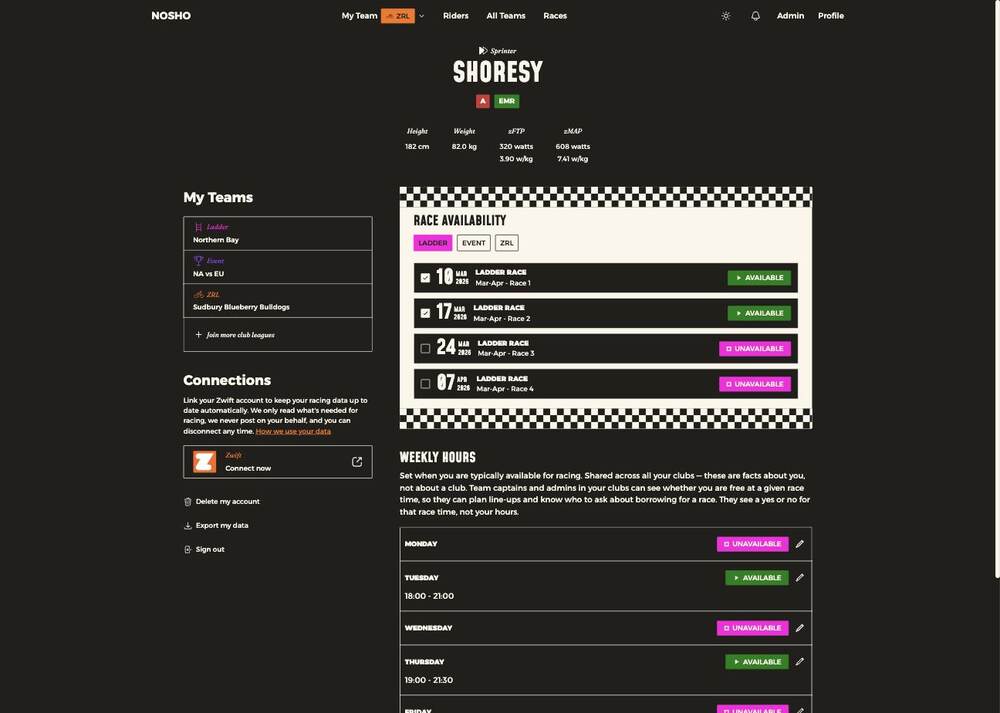
On your profile, top right. Tabs across the top — one per competition you're in. Under each, the upcoming races. Tick the box beside a race to mark yourself available and the badge flips from Unavailable to Available.
✅ There's no save button
Changes save the moment you tick. If you're waiting for a confirmation, that's why you don't see one.
Weekly Hours
Below it. Set the days and times you're typically free to race. This is shared across every club you ride for — these are facts about you, not about a club.
Your team's captains and your club's commissioners can see when you're free, hour by hour. Other captains in your clubs only see whether you're free at a race time — that's what they need to know before asking to borrow you. The privacy page has the detail.
Captains use this to plan line-ups and to know who's worth asking when they're short — so a filled-in week makes you more likely to get picked, not less.
A race tick beats your weekly hours
If you tick a specific race, you're available for it — even if it falls outside your usual hours.
Dropping out
If you're in a confirmed line-up and untick that race — or change your weekly hours so they no longer cover it — your captain gets an email. Inside 48 hours of the race it goes straight away.
⚠️ Tell them anyway
The email tells your captain you're out. A message from you tells them why, and whether you'll be back for the next one.